



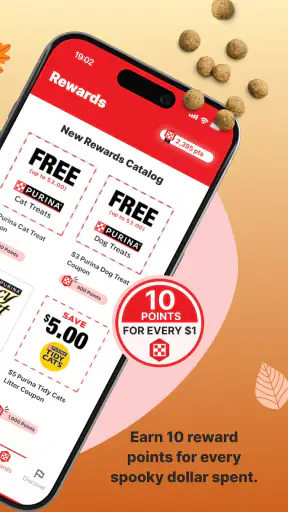
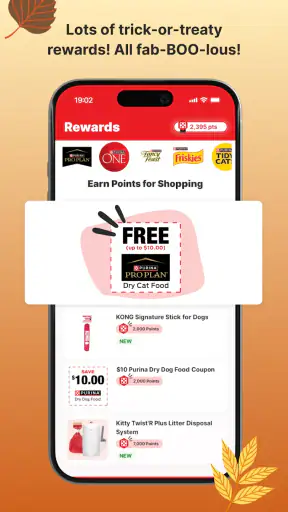
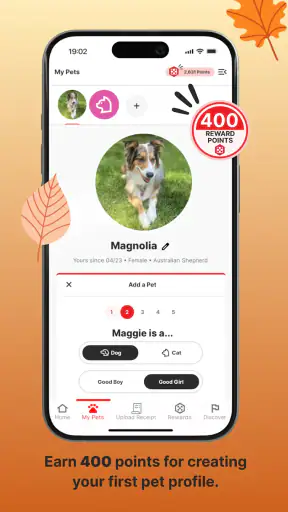
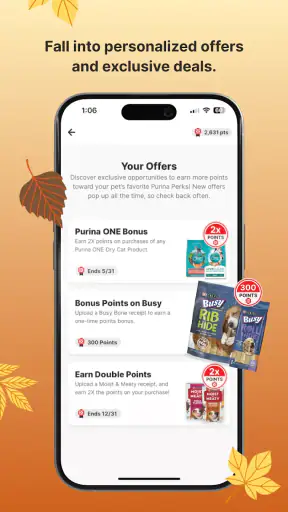
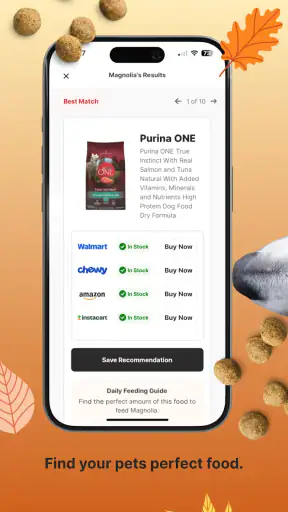
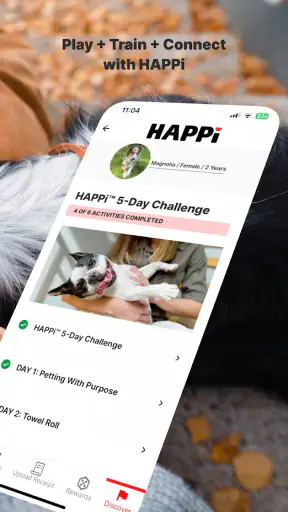
I approached myPurina as a practical companion for people who already buy Purina products and want to get more value from those purchases. It is a free lifestyle app from Nestlé Purina Petcare, combining receipt scanning for points and perks with AI-based pet-care guidance. That combination makes it more useful than a simple loyalty wallet, although it also means the app works best when you are willing to build a small routine around it.
My first impression was that the app is aimed at ordinary pet ownership rather than specialist training or veterinary care. You can use it while shopping, after bringing food home, or when you have a quick question about caring for your dog or cat. The experience is straightforward enough for occasional users, but the real benefit appears when receipt submission, account details, and care tools become part of the same repeatable habit.
How the everyday workflow comes together
The basic process is easy to understand. After buying eligible Purina products, I would keep the receipt rather than throwing it away immediately, open the app, and use the receipt-scanning flow to submit the purchase. The aim is to turn a normal shopping transaction into points that can later lead to perks. That is a more useful arrangement than manually recording purchases in a notes app, because the receipt is doing the work as evidence of the transaction.
The important practical lesson is timing. Receipt-based rewards are easiest to manage when I scan soon after shopping, while the paper or digital receipt is still available and the product details are fresh. Leaving several receipts in a drawer creates unnecessary sorting work and increases the chance of forgetting one. I found that treating the scan as the final step of the shopping trip is more reliable than considering it an occasional administrative task.
Receipt quality matters too. A clear, flat receipt is much easier to process than a crumpled one photographed under poor lighting. If the purchase confirmation is digital, keeping it accessible on the phone can make the process less awkward. I would not assume that every receipt will be accepted automatically; the app is convenient, but scanning is still dependent on readable purchase information and the relevant eligibility rules.
This is where the app differs from a general cashback service. A broad rewards platform may cover many retailers or brands, while myPurina is focused on a particular pet-care ecosystem. That narrower focus can feel limiting if you buy many competing brands, but it is also the reason the app can connect purchases with Purina-oriented perks and care content instead of presenting a completely generic rewards screen.
For a realistic example, imagine a household buying pet food during a weekly supermarket run. I would photograph the receipt before putting the groceries away, check that the image is readable, and then use the remaining time to look at the care section for a question about feeding or everyday routines. The whole habit does not need to become a long session. The value comes from combining two small actions—recording the purchase and checking useful guidance—rather than opening the app only when I remember that points exist.
What the care side adds
The AI pet-care feature gives the app a second reason to stay installed. Instead of using it only as a rewards scanner, I can ask for general guidance related to living with a pet. This is particularly helpful for low-stakes questions where I want a quick starting point, such as organizing a routine, thinking through enrichment, or understanding common care considerations.
I would still treat those answers as general information, not a substitute for a veterinarian. AI can help me frame a question or identify sensible next steps, but unusual symptoms, sudden behavior changes, possible poisoning, injury, or anything urgent calls for professional advice. The strongest use of this feature is as a convenient first layer of education, not as a diagnostic service.
That distinction also affects who should use the app. A new pet owner may appreciate having shopping rewards and basic care guidance in one place, especially when many small questions appear during the first months. An experienced owner may find the AI less essential, but could still value the purchase-tracking routine if Purina products are already part of the household budget.
Settings and account details worth checking
Before relying on the rewards side, I would spend a few minutes reviewing the account and profile areas. The useful goal is not to change every option, but to make sure the pet information and personal details are sensible for the way I actually use the app. Accurate context can make care conversations more relevant, while a neglected profile can lead to advice that feels too broad.
I would also check how the app presents points, available perks, and submitted receipts. A reward system is easier to use when I know where to confirm that a scan was recorded and where to look for the next step. This is one of the less obvious habits that prevents disappointment: I should verify a completed submission rather than assuming that taking a photo automatically means the points are already available.
Notifications deserve a deliberate decision. If reminders are helpful, they can support the receipt habit and keep perks from being overlooked. If I already receive too many alerts, leaving every notification enabled may make the app feel noisy and encourage me to ignore the useful ones. I prefer to keep only the prompts that support a clear action, such as remembering to finish a purchase-related task.
Another sensible check is the app version and device compatibility. The current version is 1.88.0, and it supports devices running Android 7.0 or later. That makes it accessible to many older Android phones, although camera quality, storage, and general device performance can still affect how pleasant receipt scanning feels. Someone using an older phone should not judge the whole service only by the first scan; lighting and camera focus may be the real source of friction.
The app is rated for Everyone, which fits its everyday subject matter. That does not mean every answer will be suitable for every situation, though. Parents can reasonably use it as a shared household tool, but I would still teach younger users not to treat an AI response as medical certainty and not to enter unnecessary personal information into a care conversation.
Shortcuts that make repeat use less tiring
The best shortcut is behavioral rather than technical: keep the app close to the place where I normally handle shopping receipts. If receipts arrive by email, I would process them when reviewing that inbox. If I receive paper copies, I would scan them before recycling them. This removes the need to remember a separate “rewards task” later.
Another useful pattern is to separate scanning from browsing. I would first complete the receipt submission, confirm that the purchase has been handled, and only then explore care content or perks. Mixing both activities from the start can make it unclear whether the important transaction step was completed. A short, consistent order is easier to repeat than opening the app without a plan.
For households with more than one pet, I would be careful when switching between care questions. Keeping the animal and its needs clear in each conversation helps avoid vague answers. A question about a young dog, for example, should not be blended with a separate question about an older cat simply because both are being asked during the same shopping session. The app can be convenient, but the quality of the interaction still depends on the clarity of the user’s input.
I also found it useful to think of perks as a reason to check the app, not as the only reason. If I open it exclusively to chase a reward, a small delay or an unclear receipt can make the whole experience feel frustrating. If I use the care content when it is genuinely relevant and scan purchases as part of the same routine, the app has more day-to-day value even when I am not immediately redeeming anything.
Compared with writing purchases in a spreadsheet, the advantage here is less manual work and a direct connection to Purina-related benefits. Compared with a general pet-information app, the advantage is the receipt and rewards layer. The trade-off is specialization: the app is not the best single destination for managing every brand, every veterinary record, or every aspect of pet ownership.
Where the experience can slow down
The receipt workflow is useful, but it is not completely frictionless. A photo may need to be retaken if text is cut off, lighting creates glare, or the receipt is too long to capture clearly. I would not recommend waiting until the end of a busy day to process a pile of receipts. The more time I leave between purchase and scanning, the more likely I am to lose the document or forget which items were bought together.
There is also a trade-off between convenience and attention. The app asks me to take an extra step after shopping, and people who buy Purina products only rarely may not feel that the habit is worth maintaining. In that case, a general rewards service or simply choosing products based on price and availability may be a better fit. The loyalty benefit is most convincing for repeat purchasers, not for someone making an isolated purchase.
The AI feature has its own boundaries. It can be appealing because it responds quickly, but quick answers can sound more confident than the situation deserves. I would use it to prepare for a conversation with a veterinarian, compare routine-care ideas, or learn what information I should gather. I would not use it to delay urgent care, change prescribed treatment, or make a serious decision based on one response.
Another limitation is that the app’s usefulness depends on how closely my shopping matches its focus. If my household regularly switches between brands, buys mostly non-Purina products, or wants a complete expense-management system, the rewards workflow will cover only part of the picture. In that situation, I might keep a broader budgeting or shopping tool alongside it rather than expecting myPurina to replace everything.
Privacy and attention are worth considering in the same practical way as any account-based app. I would provide only the information needed to use the features comfortably, review account choices occasionally, and avoid treating every prompt as something that requires an immediate response. The app is most pleasant when it supports my routine rather than becoming another source of digital clutter.
Who will get the most from it
I think the strongest audience is a dog or cat owner who buys Purina products repeatedly and wants a simple reason to keep purchase records organized. The app also makes sense for someone who enjoys having general care guidance nearby, especially when a quick question comes up outside a clinic visit. Its free price removes the main financial barrier, so the real question is whether the rewards and care tools match my habits.
It can also suit a shared household, provided everyone agrees on who scans receipts and who checks the account. Assigning that responsibility to one person avoids duplicate attempts and makes it easier to know whether a purchase has already been submitted. This is a small organizational detail, but it matters when several people shop for the same pet.
I would be less enthusiastic about it for owners who want detailed medical records, appointment scheduling, medication tracking, or a complete cross-brand pet-management system. Those needs call for a more specialized tool, a clinic portal, or a combination of services. Likewise, people who never keep receipts or dislike loyalty programs may download it once and then stop using it, regardless of the care content.
The app’s reception suggests that it has found a substantial audience: it has an average rating of 4.8 from around 60 thousand ratings, with more than a million installs. Those figures do not remove the need to judge it against my own shopping habits, but they do indicate that the basic concept is resonating with many pet owners. I see the strongest explanation in its practical combination of rewards and accessible care information.
My final routine and recommendation
After using it as a regular pet-care companion, I would recommend setting it up with a simple three-part routine. First, keep the pet and account details current enough to make care conversations useful. Second, scan a readable receipt immediately after a relevant purchase. Third, use the AI feature for everyday education while keeping veterinary professionals in charge of medical decisions.
The app is not a magic shortcut to cheaper pet ownership, and it does not replace careful shopping or professional care. Its value is cumulative: a small amount of organization after purchases, occasional access to perks, and a convenient place to think through ordinary care questions. Users who expect a fully automated rewards system may find the receipt step more involved than expected, while users who repeat the habit are more likely to see the benefit.
MyPurina is at its best as a focused companion for repeat Purina shoppers, not as an all-purpose pet-management platform. I like the way it joins a concrete shopping action with useful care content, and I appreciate that the free app can serve both practical and informational needs. I would install it if Purina purchases were already part of my routine, scan receipts promptly, and keep a veterinarian or broader pet-management tool available for needs this focused app is not designed to handle.


